Guided application wizard
Deploy a Deployment, StatefulSet or Job through six guided steps: image, environment, secret bindings, compute flavor, storage, networking and release strategy.
A developer-friendly container platform you run on your own infrastructure. Build, deploy, expose, secure and observe applications from one clean UI — even fully air-gapped.
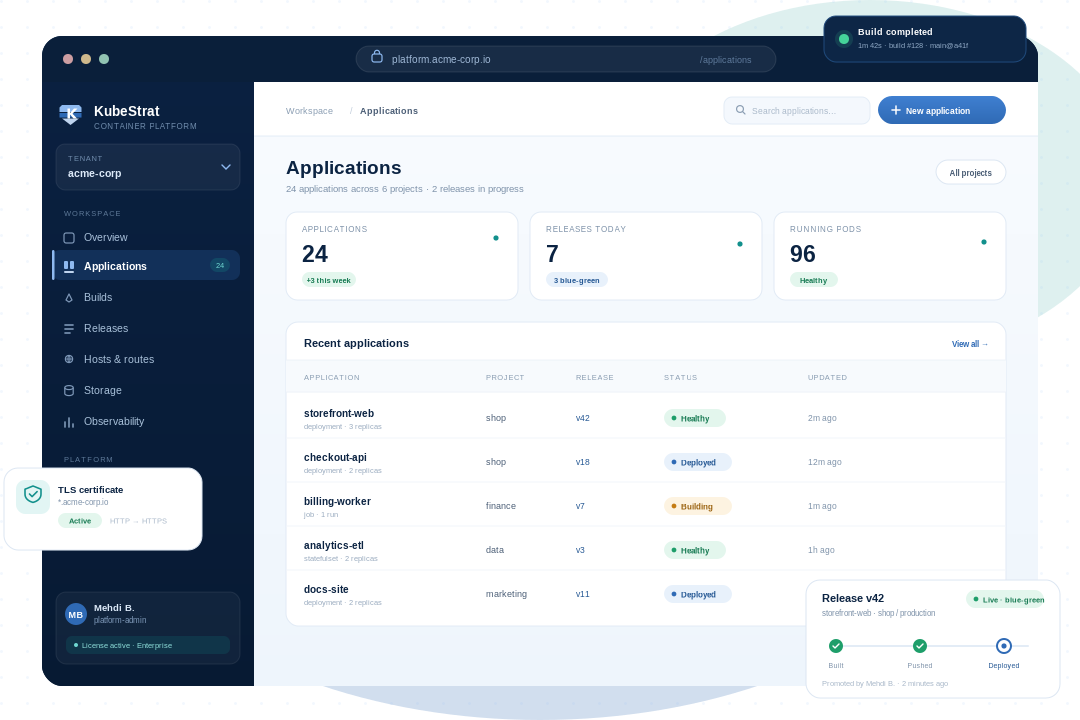
Applications, environments, secrets, routes and releases live behind a guided wizard. No tickets, no kubectl, no waiting for the platform team.
Tenants, projects, RBAC, certificates, DNS zones and compute flavors are explicit platform settings — not tribal knowledge in a wiki.
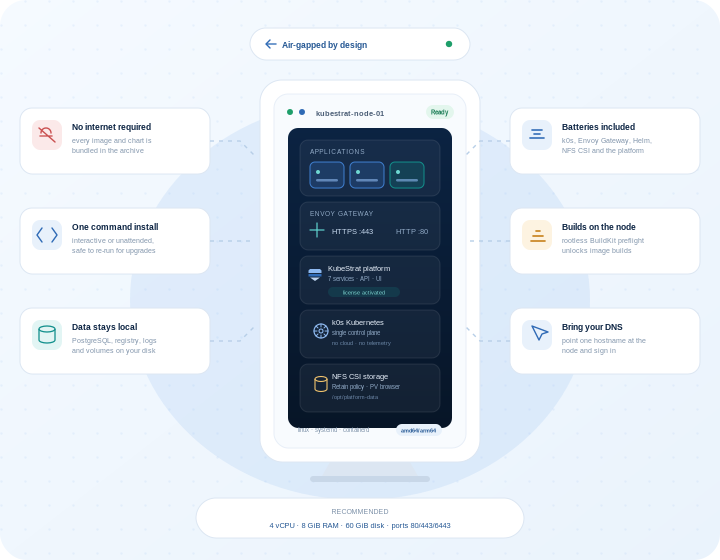
Install on one Linux node, fully offline. Your data, your registry, your cluster, your rules. No external SaaS in the critical path.
KubeStrat wraps Kubernetes with opinionated, UI-driven workflows. The complexity stays — but it stays with the platform, not with every product team.
Deploy a Deployment, StatefulSet or Job through six guided steps: image, environment, secret bindings, compute flavor, storage, networking and release strategy.
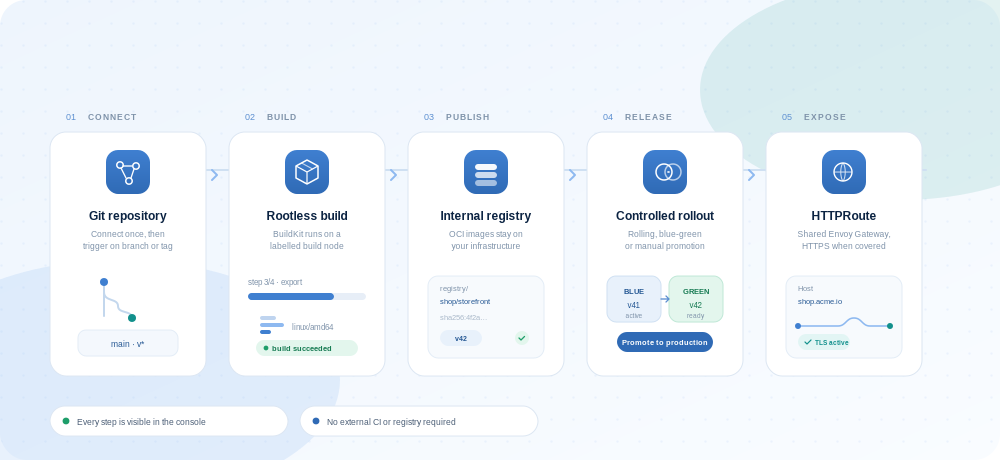
Connect GitHub or GitLab once. Rootless BuildKit builds the image on a labelled node and pushes it to the platform's own OCI registry. Trigger on a branch or tag pattern.
Choose manual, rolling or blue-green. Promote the green release from the console, follow each build and push step, and keep every release tied to the image it shipped.
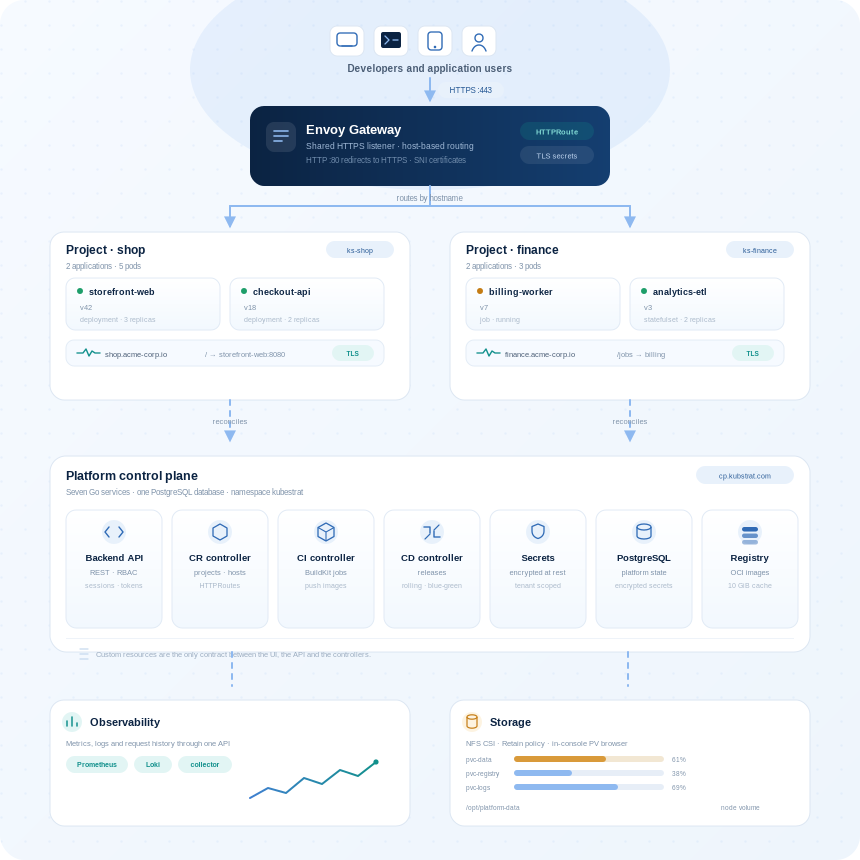
One shared Envoy Gateway. An HTTPRoute per host with path rewrites, request timeouts and header modifiers. HTTPS switches on automatically when a certificate covers the host.
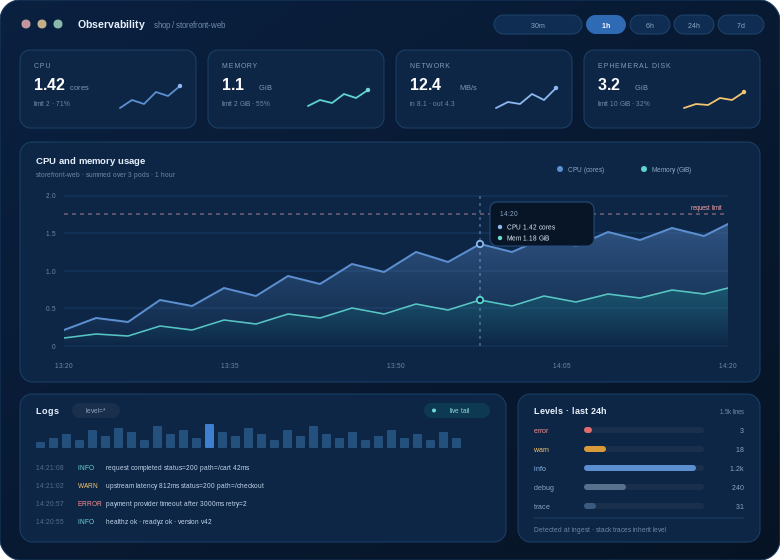
Prometheus and Loki behind a single API. CPU, memory, network and disk panels, per-pod history, a log explorer with levels detected at ingest, and live tail.
Tenants and projects with role-based access, secrets encrypted in PostgreSQL, API tokens for automation, and a runtime policy derived from each image's declared user.
Connect a repository once. KubeStrat builds the image, stores it in its own registry, creates a release, rolls it out and publishes the route — with every step visible in the console.
GitHub or GitLab, a branch or a tag pattern. Credentials are stored with the repository.
Rootless BuildKit runs on a labelled build node. The platform inspects the image config to derive the runtime user.
The image goes to the internal OCI registry with generated push credentials and stays on your infrastructure.
Roll out automatically, promote blue-green from the UI, or validate a release by hand before it goes live.
The CR controller adds the application to its host's HTTPRoute. A covering certificate turns on HTTPS and the redirect.
No YAML archaeology. The workflows your teams use every day are one click deep, with the underlying Kubernetes objects still visible when you need them.
Image, compute, storage, networking and release strategy — six steps, no manifests.
Blue-green with an explicit promotion gate, rolling updates, or a manual trigger.
Search, severity filters, a volume histogram and a five-second live tail.
Persistent volumes by claim and pod, usage against capacity, with the Retain policy.
Metrics and logs are part of the platform, not a separate project. Prometheus and Loki sit behind one read path, so the console, the API and your scripts ask the same questions.
Isolation is not an add-on. Tenancy, secrets and runtime policy are part of the platform model, and every change is reconciled by the controllers.
Tenants own projects, projects own namespaces. Roles and API tokens scope who can see and change what — without a separate identity project.
Secrets are encrypted in PostgreSQL and distributed to project namespaces by the secret controller, as Kubernetes Secrets or ConfigMaps, according to tenant ownership.
The CD controller reads the user declared in each image and applies it securely: seccomp, no privilege escalation, dropped capabilities, and a safe non-root fallback.
Open standards, self-hosted components and a documented API. No telemetry, no hidden control plane, no per-cluster dependency on a vendor service.
Seven Go services, one PostgreSQL database, one shared Gateway and one internal registry. Every component has a job you can explain to a new engineer on their first day.
The single-node installer bundles k0s, Helm, Envoy Gateway, the NFS CSI driver, every image and every chart. It verifies the machine, imports the images, installs the platform and waits for each workload — the installer itself never reaches the internet.
--hostname and --yes.
/opt/platform-data unless you explicitly remove it.
Create your account, download the single-node bundle, run the installer and activate the free Starter plan.
Register on the KubeStrat subscription portal and confirm your email address. The Starter license is issued to this account.
Create an accountAccess your Linux server over SSH (Ubuntu is recommended), then download and extract the single-node archive. It contains every image, chart and binary.
Go to downloadsEnter a hostname (a subdomain that points to the server's public IP), plus the administrator email and password. The installer waits up to 30 minutes.
Open the URL printed by the installer, generate a code request, then open the client portal, select Starter and paste the activation code back into the platform.
Activation stepsThe single-node bundle is a self-contained amd64 archive. The CLI tools connect your workstation to the platform.
# 1. download and extract the single-node bundle
curl https://subscription.kubestrat.com/download/kubestrat-platform-single-node-0.1.0-amd64.tar.gz \
  --output kubestrat-platform-single-node-0.1.0-amd64.tar.gz
tar -xzvf kubestrat-platform-single-node-0.1.0-amd64.tar.gz
cd kubestrat-platform-single-node/

# 2. install the platform; the installer waits up to 30 minutes
sudo ./install.sh --force --wait-timeout 30m

# 3. open the printed URL and activate the Starter plan
https://your-hostname · License → Generate code requestMost teams do not need a different orchestrator. They need the same Kubernetes, wrapped in workflows product teams can actually use and platform engineers can actually govern.
Swipe the table to compare all columns
| Capability | KubeStrat | DIY Kubernetes | Managed Kubernetes |
|---|---|---|---|
| Runs fully air-gapped on your own hardware | Built for it | With effort | No |
| Guided application deployment from a UI | Six-step wizard | No | Raw objects |
| Private registry and image builds included | BuildKit + OCI | Add-ons | Add-ons |
| Blue-green and rolling releases from the UI | One click | No | Tooling |
| Encrypted tenant secrets out of the box | Default | Configure | Configure |
| Metrics, logs and live tail in one place | Included | Stitch tools | Stitch tools |
| One UI for platform and application settings | Everything | No | Partial |
| Single-node install with every image bundled | One command | No | No |
The comparison describes the default experience. Add-ons and custom engineering can close most gaps, at the cost of ownership, integration work and day-two operations.
One platform, two plans. Starter is free on a single node; Enterprise is priced per vCPU pair and is coming soon.
Free on one node for evaluation and small internal workloads.
No credit card required. Installation guide
Commercial plan priced per vCPU pair.
Availability to be announced.
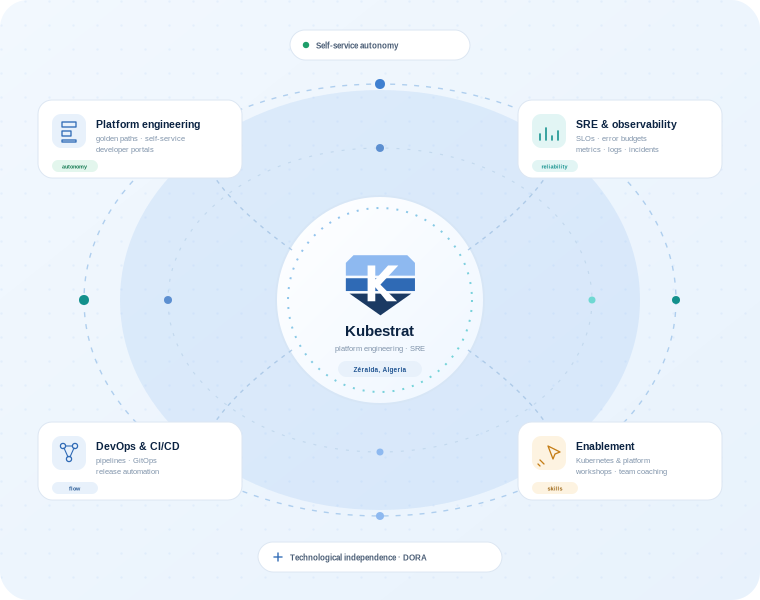
KubeStrat is built by Kubestrat, a DevOps consulting firm specialised in platform engineering and SRE. We built the platform we kept rebuilding for clients: an opinionated, self-hosted developer platform that teams can own end to end.
Golden paths and guardrails that let product teams ship without waiting on a ticket.
Open standards, self-hosted components and no lock-in in the critical path.
Delivery measured on lead time, deployment frequency, change failure rate and MTTR.
Short answers to the things that usually decide the evaluation.
KubeStrat is a self-hosted container platform that runs on Kubernetes and wraps it in UI-driven workflows: applications, builds, releases, hosts, routes, TLS, secrets, storage and observability. It is not a new orchestrator; it is an opinionated platform layer on top of Kubernetes.
Yes. The single-node installer ships with every image, chart and binary, so installation and day-two operations do not call Docker Hub, GitHub or any time server. Optional Git integrations still need network access to your Git provider.
Deployments, StatefulSets and Jobs from any OCI image. You can attach NFS-backed storage with a Retain policy, bind secrets and environment variables, pick a compute flavor, and expose the workload on a host through an HTTPRoute with TLS.
DNS zones and certificates are managed in the administration area. Each host maps to an HTTPRoute on the shared Envoy Gateway. When a certificate covers the host, HTTPS is enabled automatically along with the HTTP-to-HTTPS redirect.
There are two plans. Starter is free for one single-node installation with up to 2 vCPU pairs (4 vCPU) and no support. Enterprise is priced per vCPU pair and is coming soon. Activation happens through the subscription portal with the license issued for your installation.
A Linux node with 4 vCPU, 8 GiB of RAM and 60 GiB of free disk on amd64 or arm64, with ports 80, 443 and 6443 available. The installer verifies the machine before it changes anything.
Download the single-node bundle, run the installer and sign in. When you are ready, the same platform grows into your production footprint without changing the model.